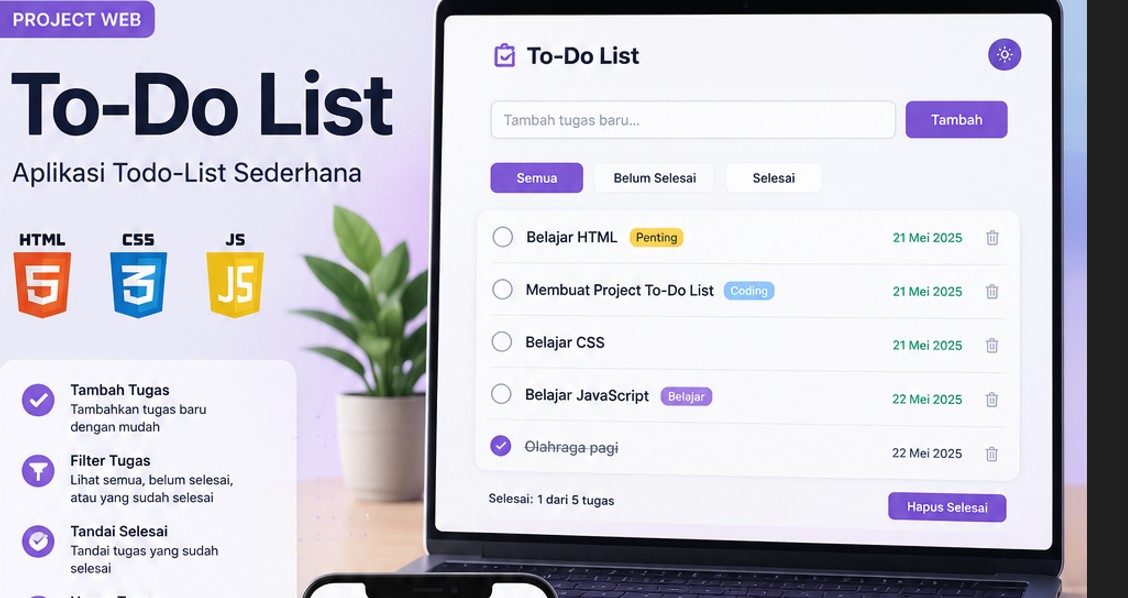
Berikut adalah panduan lengkap beserta struktur file dan kodenya!
1. Struktur File Proyek
Buat satu folder baru dan simpan tiga file berikut di dalamnya:
- index.html (Struktur kerangka aplikasi)
- style.css (Desain dan animasi)
- script.js (Logika interaktif dan penyimpanan data)
<!DOCTYPE html>
<html lang="id">
<head>
    <meta charset="UTF-8">
    <meta name="viewport" content="width=device-width, initial-scale=1.0">
    <title>Aplikasi To-Do List Modern</title>
    <link rel="stylesheet" href="style.css">
    <!-- FontAwesome untuk ikon tombol -->
    <link rel="stylesheet" href="https://cdnjs.cloudflare.com/ajax/libs/font-awesome/6.4.0/css/all.min.css">
</head>
<body>

    <div class="container">
        <h2>To-Do List Harian 📝</h2>

        <!-- Form Input Tugas -->
        <div class="input-section">
            <input type="text" id="task-input" placeholder="Tulis rencana tugasmu di sini..." autocomplete="off">
            <button id="add-btn"><i class="fa-solid fa-plus"></i> Tambah</button>
        </div>

        <!-- Informasi Sisa Tugas -->
        <div class="task-stats">
            <span>Belum selesai: <strong id="pending-count">0</strong></span>
            <button id="clear-all">Hapus Semua</button>
        </div>

        <!-- Daftar Tugas -->
        <ul id="task-list">
            <!-- Tugas akan dimasukkan secara dinamis lewat JavaScript -->
        </ul>
    </div>

    <script src="script.js"></script>
</body>
</html>* {
box-sizing: border-box;
margin: 0;
padding: 0;
}
body {
font-family: 'Segoe UI', Tahoma, Geneva, Verdana, sans-serif;
background: linear-gradient(135deg, #f5f7fa 0%, #c3cfe2 100%);
min-height: 100vh;
display: flex;
justify-content: center;
align-items: center;
padding: 20px;
}
.container {
background: white;
width: 100%;
max-width: 480px;
padding: 30px;
border-radius: 16px;
box-shadow: 0 10px 30px rgba(0, 0, 0, 0.1);
animation: fadeIn 0.5s ease-in-out;
}
@keyframes fadeIn {
from { opacity: 0; transform: translateY(-20px); }
to { opacity: 1; transform: translateY(0); }
}
h2 {
color: #2c3e50;
margin-bottom: 20px;
text-align: center;
font-size: 1.6rem;
}
/* Bagian Input */
.input-section {
display: flex;
gap: 10px;
margin-bottom: 20px;
}
#task-input {
flex: 1;
padding: 12px 15px;
border: 2px solid #e0e0e0;
border-radius: 10px;
font-size: 1rem;
outline: none;
transition: border-color 0.3s ease;
}
#task-input:focus {
border-color: #667eea;
}
#add-btn {
background: #667eea;
color: white;
border: none;
padding: 0 20px;
border-radius: 10px;
font-weight: bold;
cursor: pointer;
transition: background 0.3s ease, transform 0.2s ease;
}
#add-btn:hover {
background: #5a6fd6;
transform: translateY(-2px);
}
/* Statistik Tugas */
.task-stats {
display: flex;
justify-content: space-between;
align-items: center;
font-size: 0.9rem;
color: #666;
margin-bottom: 15px;
padding-bottom: 10px;
border-bottom: 1px solid #eee;
}
#clear-all {
background: none;
border: none;
color: #e74c3c;
cursor: pointer;
font-weight: 600;
font-size: 0.85rem;
}
#clear-all:hover {
text-decoration: underline;
}
/* Daftar List Tugas */
#task-list {
list-style: none;
max-height: 300px;
overflow-y: auto;
}
.task-item {
display: flex;
justify-content: space-between;
align-items: center;
background: #f8f9fa;
padding: 12px 15px;
border-radius: 10px;
margin-bottom: 10px;
transition: all 0.3s ease;
animation: slideIn 0.3s ease;
}
@keyframes slideIn {
from { opacity: 0; transform: translateX(-10px); }
to { opacity: 1; transform: translateX(0); }
}
.task-item:hover {
background: #f1f3f5;
}
.task-item.completed span {
text-decoration: line-through;
color: #adb5bd;
}
.task-content {
display: flex;
align-items: center;
gap: 12px;
flex: 1;
cursor: pointer;
word-break: break-word;
}
.task-content input[type="checkbox"] {
width: 18px;
height: 18px;
cursor: pointer;
accent-color: #667eea;
}
/* Tombol Hapus per Item */
.delete-btn {
background: none;
border: none;
color: #ff6b6b;
cursor: pointer;
font-size: 1rem;
padding: 5px;
transition: color 0.2s ease, transform 0.2s ease;
}
.delete-btn:hover {
color: #fa5252;
transform: scale(1.1);
}<script>
const cars = ["BMW", "Volvo", "Saab", "Ford", "Fiat", "Audi"];
let text = "";
for (let i = 0; i < cars.length; i++) {
text += cars[i] + "<br>";
}
document.getElementById("demo").innerHTML = text;
</script>- Penyimpanan Lokal (Local Storage): Semua daftar tugas yang Anda ketik akan otomatis tersimpan di memori browser. Jadi, jika halaman ditutup atau di-refresh, tugas Anda tidak akan hilang.
- Indikator Tugas Belum Selesai: Terdapat penghitung otomatis di bagian atas untuk memantau berapa banyak tugas yang masih harus diselesaikan.
- Mendukung Tombol Enter: Anda bisa langsung menekan tombol Enter pada keyboard setelah mengetik tugas tanpa harus mengklik tombol tambah.
- Keamanan XSS: Dilengkapi fungsi pembersih teks dasar agar inputan aman dari potensi injeksi kode berbahaya.